




Key takeaways
- An AI autorouter still has to solve the routing problem: copper paths between pads, on the allowed layers, within width and clearance rules. AI adds either a learned policy that picks the next move or a model that drives the router and fixes what the design-rule check reports.
- The loop is where the gain is. On LG AI Research's PCBWorld-Bench (13 October 2026, one attempt per board, every attempt counted, scored by KiCad's DRC), ProtoFlow's router alone left 91 of 99 small boards clean; ProtoFlow Studio driving the same router with Claude Opus 5.5 left 98 of 99 clean, in a median of 32 seconds.
- Copy the benchmark's definition of clean: every net connected and zero error-level violations in KiCad's DRC. One missing connection is a failed board.
- Before you pay for fabrication, check any autorouted board yourself: your fab's rules, zero unconnected items, refilled zones, no moved parts, and a look by hand at power, differential pairs and RF.
An AI PCB autorouter connects the pads of a placed board with copper while keeping to your width and clearance rules. The useful ones also check their own work: they run the design-rule check, read each violation and fix it. On PCBWorld-Bench (13 October 2026), that loop took one router from 91 to 98 clean boards out of 99.
The problem
What a router has to solve
The netlist says which pads must connect. Placement has already fixed where every part sits. The router has to find a copper path for each connection on the layers you allow, at the track width and clearance your rules set, through vias where it changes layer, without touching another net on the same layer and without entering keep-out areas.
Every track it lays down takes space the remaining connections might have needed, so the order matters. A board that looks easy can jam on its last few connections, and a board with one connection unrouted is not nearly done. It is a board that does not work, which is why the benchmark below scores a single missing connection as a fail.
Approaches
Three ways routers work today
Algorithmic
Search and rip-up
Maze and shape-based search, from Lee's algorithm and A* onward, with rip-up and reroute: route each connection, and when one fails, tear up what blocks it and try a different order. Freerouting works this way, as do the autorouters in established suites. Fast and predictable, and they follow the rules you give them and nothing else.
Learned
Trained policies
A model trained, often with reinforcement learning, to choose the next routing move or the order of connections, sometimes with physics or rule checks in the loop. Cloud routing services use this approach on a board you prepare in your own ECAD tool and upload.
Agent
Agent loops
A language model drives a conventional router and the design-rule checker. It reads the board and its rules, sets keep-outs and net widths, routes, runs DRC, reads each violation, repairs it and checks again. ProtoFlow Studio works this way inside the ProtoFlow PCB editor.
An agent loop does not replace the router. The router still does the geometry, quickly. The model decides what to try, in what order, and what to do when the check fails, which is the part a standalone router leaves to you.
Evidence
What the loop adds, measured
PCBWorld-Bench is a public routing benchmark from LG AI Research, built from real open-source KiCad boards. The router gets each placed board without its tracks, and KiCad's own design-rule check scores the result. A board is a Clean Pass when every net is connected and KiCad finds zero error-level violations under the benchmark's rules.
91 / 99
Router alone
Small boards (D3-A) clean, no AI model, median 0.1 s
98 / 99
Router plus agent loop
ProtoFlow Studio with Claude Opus 5.5, median 32 s
30 / 30
Medium boards
D3-B: 10 boards, 3 attempts each, all counted
$0.33
Median model cost
Per small board, at list price
Conditions for those numbers: our run of 13 October 2026, one attempt per board, every attempt counted, a 30-minute limit per attempt, scored by KiCad's design-rule check. The agent setup uses a paid model. The one miss on the small boards was a ProtoFlow file-save bug, and that board was clean once the bug was fixed. These are results for these boards. They do not promise that yours will route.
One example of what the loop catches. Some of these boards carry text on a copper layer. A router that treats only pads, tracks and zones as obstacles will run a track straight through the letters, which shorts nets on the real board. In our 13 October runs, ProtoFlow's router alone missed boards for reasons like this. With the loop, Studio drew keep-out areas around the copper text before routing and let the router work around them.
A real board
Routing around the designer's placement
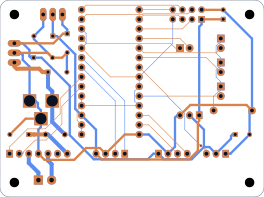
Benchmarks are small boards. The test working engineers care about is simpler to state: take my placement, leave it alone, and route it clean. On 16 October 2026 we took IO Rodeo's open-source Rodeostat (CC BY 4.0), removed its tracks and vias, and kept the designer's placement. ProtoFlow Studio, on release 3.2.3, made all 372 connections with zero KiCad errors and no part moved, in 42 minutes 47 seconds, with one reminder from the operator. We ran KiCad's check again after KiCad refilled the copper pours, with the same result.
Limits
Where autorouters still fall short
On the same day we ran two denser open-source boards, mjbots' moteus-c1 and the pico-ice. Both came back about 90 percent routed, with KiCad errors. That is a partial result, not a pass, and it is the honest edge of what we have measured so far.
Routers only know your rules
A router does not know that a net carries 2 A, feeds an antenna or is a sensitive analog input. Unless a net class says so, it routes that net like any other signal. Set widths, clearances and keep-outs before you route.
Copper pours can change after a refill
A board can pass with its stored zone fills and fail once the zones are refilled, because a ground connection that existed in the old fill is gone. Refill every zone before the final check.
Dense and high-speed boards are unproven
We have not published KiCad-checked results for impedance-controlled, RF or dense BGA routing, so we make no claim about them. Route those nets by hand or with explicit rules, then let the router finish the rest.
Clean is not the same as good
Zero DRC errors means the copper obeys the rules. It does not mean the return paths are short, the switching loop is tight or the crystal traces are quiet. Those need a person who knows what the board is for.
Checklist
How to check an autorouted board before you order
Load your fab's rules, then run DRC
Step 1Enter your fab's minimum track, spacing, drill, annular ring and edge clearance in the board setup before anything else. A clean result against default rules tells you very little.
Read the unconnected count, not just the errors
Step 2KiCad's DRC dialog lists unconnected items on their own tab. Zero violations with one unconnected item is still a failed board.
Refill every zone, then check again
Step 3Tick "Refill all zones before performing DRC" in KiCad's DRC dialog, or refill by hand first. Stored fills can hide a broken ground connection.
Confirm nothing moved
Step 4Lock footprints you placed before routing. Afterwards, compare positions with your placement; if the project is in Git, the diff of the board file shows any moved footprint.
Walk the critical nets by hand
Step 5Power paths at their real current, USB and other differential pairs, crystal traces, RF feeds and sensitive analog nets. This is the part no checker does for you.
Open the Gerbers in a separate viewer
Step 6The fab builds from the Gerbers, not from your editor. Check copper, solder mask, silkscreen and drill layers in a Gerber viewer before you upload.
In practice
Where routing sits in a full flow
Routing is one stage of AI PCB design, between placement and the final checks. In ProtoFlow it happens in the same editor as the schematic and DRC: a built-in auto-router with presets, layer filters and a completion summary when you want to route on demand, and ProtoFlow Studio when you want the whole loop from a written brief. Both save a KiCad project, so you can run every check above in KiCad itself.
Frequently asked questions
How does AI PCB autorouting work?
It starts from a placed board and its rules. A conventional router finds copper paths between pads; the AI part either chooses moves with a trained model or, in an agent loop, drives the router, runs the design-rule check, reads each violation and fixes it until the board is clean or time runs out.
What is the difference between AI PCB layout and autorouting?
Autorouting connects the pads of a board whose parts are already placed. AI PCB layout usually also covers placement, deciding where each part goes, and the checks afterwards. Placement decides most of how routable and how quiet a board is, so a tool that only routes leaves that judgement to you.
Can an AI autorouter respect DFM constraints?
It can respect the ones it is given as rules. Load your fab's minimum track, spacing, drill and edge clearance before routing, and a loop that runs DRC will fix violations against them. Anything that is not a rule, such as current, heat or where a test probe must land, still needs net classes, keep-outs or a person.
Why does one unrouted connection count as a failure?
Because the board does not work. A missing connection has to be added by hand, often by rerouting tracks around it, and on a fabricated board it means a bodge wire or a respin. Benchmarks such as PCBWorld-Bench score it as zero for that reason.
Sources
Keep reading
Article
How to Review an AI-Generated PCB Layout Before You Order
An AI-drafted board is a fast first pass, not a finished design. This is the five-pass review we use before ordering: connectivity, placement, routing, copper pours and fab files, with an independent checker and the datasheets open.
ReadArticle
How to Choose AI PCB Software: An Afternoon Test
Feature lists all look the same. A single test brief, run through every candidate and scored on the same eight checks, tells you in an afternoon which AI PCB tool actually saves you time.
ReadArticle
AI Circuit Board Design: From Prompt to Fabricated PCB in 2026
AI circuit board design stopped being a demo somewhere in the last two years. The full chain, prompt to schematic to placed and routed board to Gerbers, now runs in real tools. Here is what each stage genuinely does, where it still fails, and how to use it without shipping a board that does not work.
ReadResource
ProtoFlow: AI PCB design software
A free desktop app that takes a board from a plain-language description through schematic, PCB layout, simulation and manufacturing files.
OpenResource
PCBWorld-Bench results, checked in KiCad
ProtoFlow Studio on LG AI Research's public routing benchmark: all 99 small boards KiCad-clean.
OpenResource
Which PCB Autorouter Should You Use? Traditional and AI Options Compared
Traditional and AI PCB autorouters compared: Freerouting, Altium Situs, Fusion, EasyEDA, Quilter, DeepPCB and ProtoFlow, with costs, formats and limits.
OpenResource
KiCad Autorouting in 2026: Every Option That Actually Works
KiCad 10 has no full-board autorouter, only Attempt Finish Selected. What works in 2026: Freerouting (with KiCad 10 IPC), cloud AI routers and ProtoFlow.
Open